
Product review
Huion Inspiroy Dial 2 Review: Wireless Tablet with 2 Dials (2026)
We may earn a commission when you buy through links on this page, at no extra cost to you. Affiliate disclosure
The Huion Inspiroy Dial 2 suits retouchers and illustrators who want a 10.5 x 6.56 inch active area, 2 dials and 6 buttons with Bluetooth. Skip it if your desk cannot fit a 356 mm wide tablet.
Who this helps: This review helps you decide whether the Inspiroy Dial 2 fits your retouching or drawing desk. It is desk research from Huion documentation, not a hands-on test, and driver support depends on your operating system.
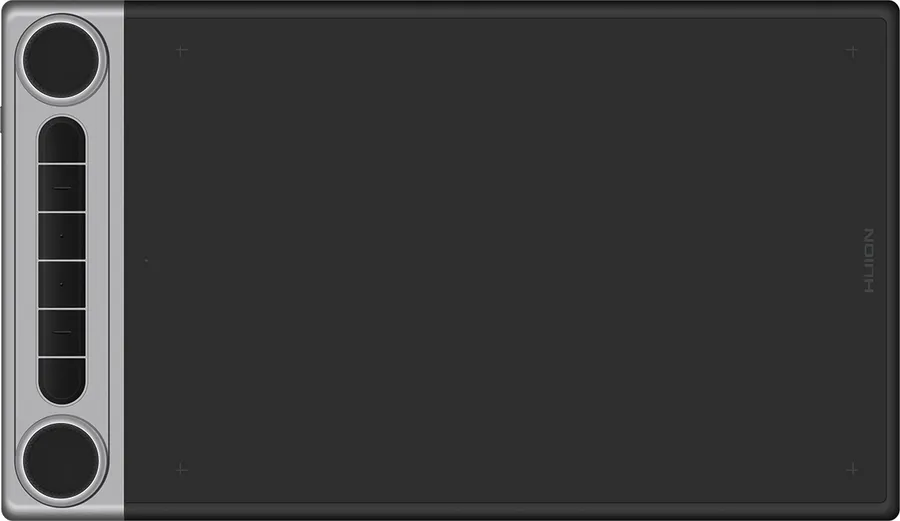
Product at a glance
Huion Inspiroy Dial 2 (Q630M)
A medium wireless pen tablet for retouchers and illustrators who want two dials for zoom and brush size and the option of Bluetooth.
- Active area: 266.7 x 166.7 mm (10.5 x 6.56 in)
- Controls: 2 customizable dials, 6 customizable buttons
- Connection: USB-C cable or Bluetooth
- Dimensions: 356.6 x 207 x 8 mm
Verdict: who the Inspiroy Dial 2 is for
The Inspiroy Dial 2 is a good fit for photo retouchers and illustrators who want a medium active area plus two dials for zoom, brush size or rotation, without a cable if they prefer Bluetooth. Huion lists a 266.7 x 166.7 mm (10.5 x 6.56 in) working area, 2 customizable dials and 6 customizable buttons.
The dials are the reason to choose this model. Turning a dial to change brush size or zoom keeps your eyes on the image instead of on keyboard shortcuts.
The tablet is 356.6 mm wide, so measure your desk first. Readers who work on a small laptop desk may prefer a smaller tablet, and readers on very large monitors may want a bigger active area.
Verified specifications
Huion lists the active area, the dial and button count, USB-C or Bluetooth connection, the body size and a 710 g weight.
| Attribute | Huion Inspiroy Dial 2 (Q630M) |
|---|---|
| Active area | 266.7 x 166.7 mm (10.5 x 6.56 in) |
| Controls | 2 customizable dials, 6 customizable buttons |
| Connection | USB-C cable or Bluetooth |
| Dimensions | 356.6 x 207 x 8 mm |
| Weight | 710 g |
| Battery life | About 18 hours (Huion B2B listing) |
Pen details such as pressure levels and tilt come from reviews rather than the Huion pages we checked, so we leave them out of the table.
Active area and monitor fit

A 10.5 x 6.56 inch active area suits most single monitors in the 24 to 27 inch range for retouching, where you make many small, precise strokes. Because the area is wider than tall, it maps naturally to a widescreen display.
Our guide on choosing pen tablet active area for a large monitor explains how the ratio between tablet and screen affects precision and arm movement. Use it if you work on an ultrawide or two monitors.
| Setup | How the Dial 2 fits |
|---|---|
| Laptop or one small monitor | Comfortable, with short hand movements |
| One 24 to 27 inch monitor | A balanced fit for most retouching |
| Ultrawide or two monitors | Map it to one screen for precision |
Strengths and limitations
Strengths are the dual dials, wireless option and medium active area; limits are the desk footprint and the need to confirm driver support for your system.
- Strengths: 2 dials and 6 buttons, USB-C or Bluetooth, and a 10.5 x 6.56 inch area in an 8 mm thin body.
- Limitations: 356.6 mm wide, which needs real desk space, and battery life depends on use.
- Unknown from the documentation we checked: exact pen specifications on Huion's own spec table and the newest supported OS versions.
For most retouchers on one monitor, the dials save more time than a larger surface would, which is why this model stands out in its size class.
Alternatives to consider
Pick a different tablet when your desk is small, your monitor is very large, or you want the pen to draw directly on a screen. These cases point to a different size or type rather than a different brand.
- Small desk or laptop work: a small screenless tablet with a 6 to 8 inch active area takes less space and still handles retouching.
- Large or multiple monitors: a large tablet with an active area above 12 inches reduces the scaling between hand and screen.
- Drawing on the image itself: a pen display shows the image under the pen, which some illustrators prefer, at the cost of more desk space and power cables.
- Separate dial controller: if you already own a tablet without dials, a stand-alone dial controller can add the same zoom and brush shortcuts.
Compare options on active area, number of dials and buttons, connection type and driver support for your operating system.
Before you buy: checklist
Confirm these points before you buy the Inspiroy Dial 2.
- Your desk has at least 36 cm of width beside or in front of the keyboard.
- Huion's driver supports your operating system version.
- A 10.5 x 6.56 inch active area suits your monitor size.
- You will use the dials for zoom, brush size or rotation.
- You decided between Bluetooth and the USB-C cable for daily use.
FAQ
How large is the Huion Inspiroy Dial 2 active area?
Huion lists a working area of 266.7 x 166.7 mm, or 10.5 x 6.56 inches. The whole tablet measures 356.6 x 207 x 8 mm, so plan desk space for the full body, not only the drawing surface.
Is the Inspiroy Dial 2 wireless?
Yes. Huion documents connection by USB-C cable or Bluetooth. Bluetooth removes the cable from the desk, while USB-C avoids any battery concerns during long sessions. Huion's business listing gives about 18 hours of battery life.
What can the two dials do?
The dials are customizable through Huion's driver, so you can assign zoom, brush size, canvas rotation or scrolling. Many retouchers put zoom on one dial and brush size on the other, because those change constantly while working.
Is the Inspiroy Dial 2 good for photo retouching?
Its medium active area suits precise strokes on a single monitor, and the dials keep frequent adjustments under your fingers. Confirm that Huion's driver supports your editing app's pressure input and your operating system version before you buy.
Who should choose a different tablet?
Choose a smaller tablet if your desk is under about 40 cm wide or you work mostly on a laptop. Choose a larger active area if you draw with big arm movements or map the tablet across two monitors.
Sources
- Huion: Inspiroy Dial 2 product page — checked 2026-11-20
- Huion business: Q630M specifications — checked 2026-11-20
Ready to decide?
Check the current listing for the Huion Inspiroy Dial 2 (Q630M) on Amazon.
View on Amazon